
Chas Frederick

Summary
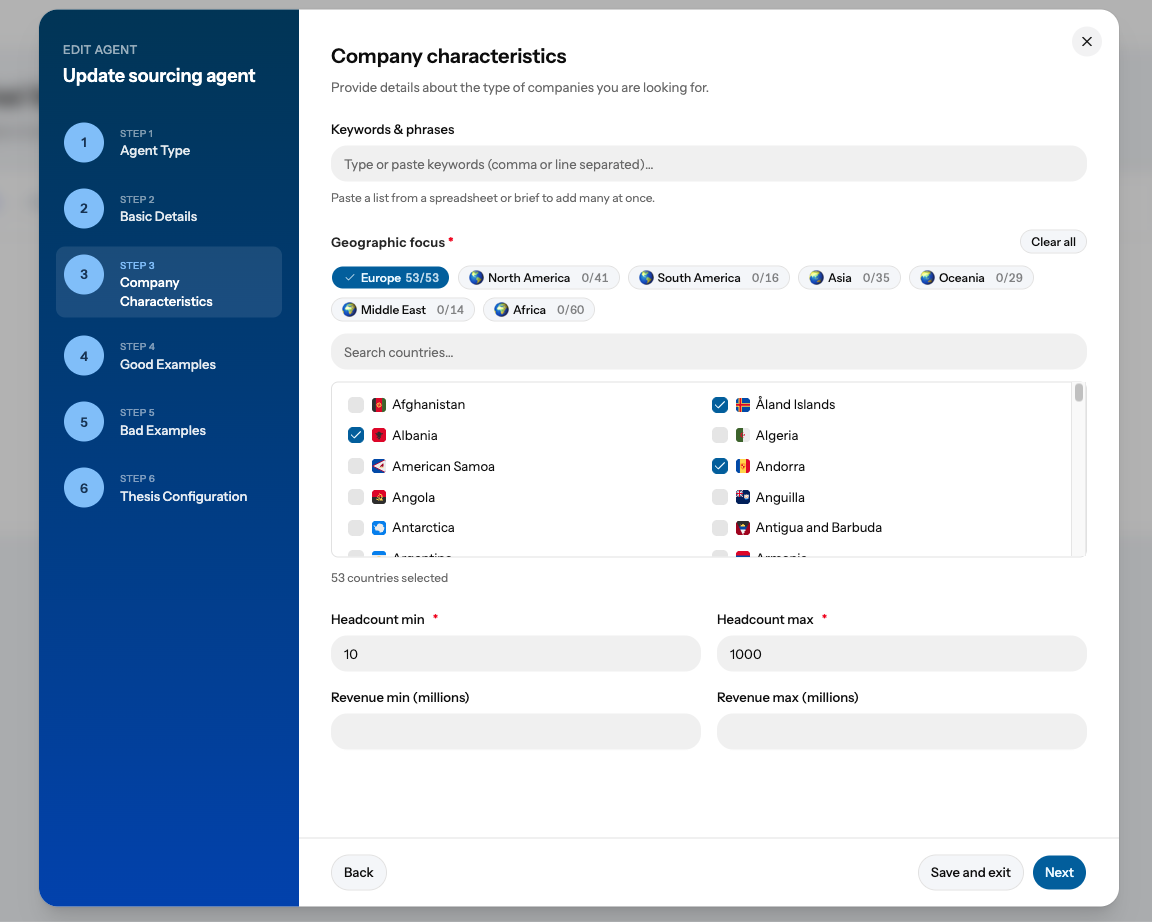
You can now jump straight to the part of an agent you want to change and save the moment you're done. Two additions to the agent edit flow make this possible: clickable sections in the left-hand navigation, and a Save and exit button on every step.
Until now, changing one setting on an existing agent meant clicking Next through every screen to reach the end and save. Switching an agent from private to public, tweaking a red line or adding a criterion each took a full walk through the flow. Now a quick change takes a few seconds, and your agent keeps working exactly as before.
How to use it
- Open the agent you want to change. Find it in your agents list and choose to edit it. The edit flow opens with every section listed in the left-hand navigation.
- Jump straight to the section you need. Click any section name in the left-hand navigation to go directly to it. There's no need to step through the screens in between.
- Make your change. Update the field, setting or criterion as you normally would.
- Click Save and exit. You'll find it next to the Next button on every step. Your changes are saved and you're returned to where you started.
Example: to make an agent visible to your colleagues, open it, click the section that holds its visibility setting, switch it from private to public, then click Save and exit. That's it.
Your agent stays protected
If a change leaves a screen incomplete (for example, you clear a mandatory field), you'll see a message explaining what needs fixing. You won't be able to save or move to another section until it's resolved. This means an agent that's already running can never be left half-configured.
Good to know
- Editing only. Section navigation and Save and exit apply when you edit an agent that already exists. Creating a new agent still takes you through each step in order, so nothing important is missed first time round.
- Available now. The update is live for all Deal Engine users, with nothing to switch on.
This improvement came directly from user feedback, so thank you to everyone who told us the old flow slowed them down. If there's anything else that gets in the way of managing your agents, let your account team know.