
Chas Frederick
Summary
You can now see what a company's employees think of it, right on its company page in Deal Engine. Employee review scores from Core Signal now appear on the People tab, with the overall rating also shown on the Overview tab.
Culture, leadership and employee sentiment can say a lot about a business before you ever speak to it. Until now, getting that view meant leaving the platform and searching review sites company by company. With employee reviews built into the company page, you can weigh up how a target treats its people alongside everything else you already track, and spot red flags or standout cultures earlier in your process.
Get a quick read from the Overview tab
Open any company and you'll see its overall employee rating as a single line on the Overview tab. It's a fast way to sense-check a company while you're screening, without clicking any further.
Dig into the detail on the People tab
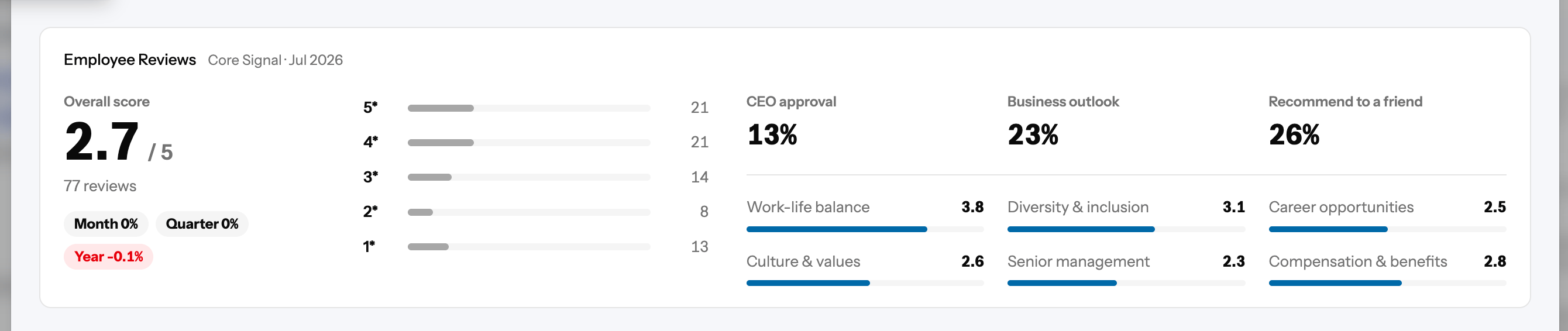
For the fuller picture, go to the People tab and scroll to the new Employee Reviews section. Here you'll find:
- The overall rating, so you can see at a glance how employees rate the company as a place to work.
- Category scores, such as work–life balance and CEO approval, so you can see where a company is strong and where it may be struggling.
- The star breakdown, showing how many reviewers gave each star rating, so you can tell whether a score reflects broad agreement or a split opinion.
Put it to work
- When screening, use the overall rating as an early signal of whether a business is worth a closer look.
- Before a meeting, check the category scores to prepare questions about leadership, retention or culture.
- During diligence, use the star breakdown to judge how consistent employee sentiment really is.
Good to know
- Data comes from Core Signal and is refreshed quarterly.
- No data, no guesswork. Where a company has no review data for a score, you'll see a dash rather than an estimate.